
Trong vài năm gần đây, AI coding assistants đã thay đổi cách developer làm việc. Bên cạnh Cursor, Claude Code đang trở thành một trong những công cụ được nhiều kỹ sư phần mềm sử dụng nhờ khả năng hiểu codebase lớn, reasoning tốt và xử lý các tác vụ phức tạp.
Tuy nhiên, nhiều developer vẫn chưa khai thác hết sức mạnh của Claude. Thay vì sử dụng nó như một công cụ sinh code đơn thuần, bạn nên xem Claude như một pair programmer có khả năng đọc hiểu toàn bộ dự án và hỗ trợ đưa ra quyết định kỹ thuật.
Trong bài viết này, chúng ta sẽ tìm hiểu những phương pháp hiệu quả nhất để làm việc với Claude Code trong các dự án thực tế.
1. Claude Code là gì?
Claude Code là môi trường làm việc dành cho developer được xây dựng bởi Anthropic.
Khác với nhiều AI coding tools khác, Claude tập trung mạnh vào:
- Understanding large codebases
- Multi-step reasoning
- Refactoring
- Architecture discussions
- Technical planning
- Documentation generation
Nói cách khác, Claude thường mạnh hơn ở việc “nghĩ” trước khi code.
2. Đừng yêu cầu Claude viết code ngay
Sai lầm phổ biến:
Build me a notification system.Cách tốt hơn:
Analyze my current architecture.

Identify where a notification system should be placed.

List potential approaches.

Recommend the best approach and explain why.

Only then generate code.
Bằng cách này, Claude sẽ reasoning trước khi implementation.
Ngoài ra, bạn cũng sẽ nhận được nhiều insight về trade-off của từng giải pháp.
3. Luôn cung cấp context
Claude hoạt động tốt nhất khi có đầy đủ context.
Ví dụ kém:
Create a user service.Ví dụ tốt:
This is a NestJS application.

We use:
- Prisma
- PostgreSQL
- Redis
- JWT authentication

Follow existing project conventions.

Create a UserService that handles profile updates.
Càng nhiều context liên quan, output càng chính xác.
4. Sử dụng Plan First Workflow
Một workflow rất hiệu quả:
Step 1:

Analyze the problem.

Step 2:

Create an implementation plan.

Step 3:

Identify risks and edge cases.

Step 4:

Generate code.

Step 5:
Review the generated solution.
Workflow này thường cho kết quả tốt hơn việc yêu cầu code ngay từ đầu.
5. Yêu cầu Claude Review Trước Khi Merge
Claude hoạt động rất tốt như một reviewer.
Ví dụ:
Review this pull request.

Focus on:
- Security issues
- Performance concerns
- Edge cases
- Maintainability
Ngoài ra, Claude thường phát hiện được:
- Missing validations
- Race conditions
- Error handling issues
- Naming inconsistencies
6. Sử dụng Claude để Refactor
Một trong những use case mạnh nhất của Claude là refactoring.
Ví dụ:
Analyze this module.

Identify:
- Duplicated logic
- Dead code
- Violations of SOLID principles
- Opportunities for extraction

Propose a refactoring plan before modifying code.
Điều này giúp tránh các thay đổi quá lớn và giảm rủi ro.
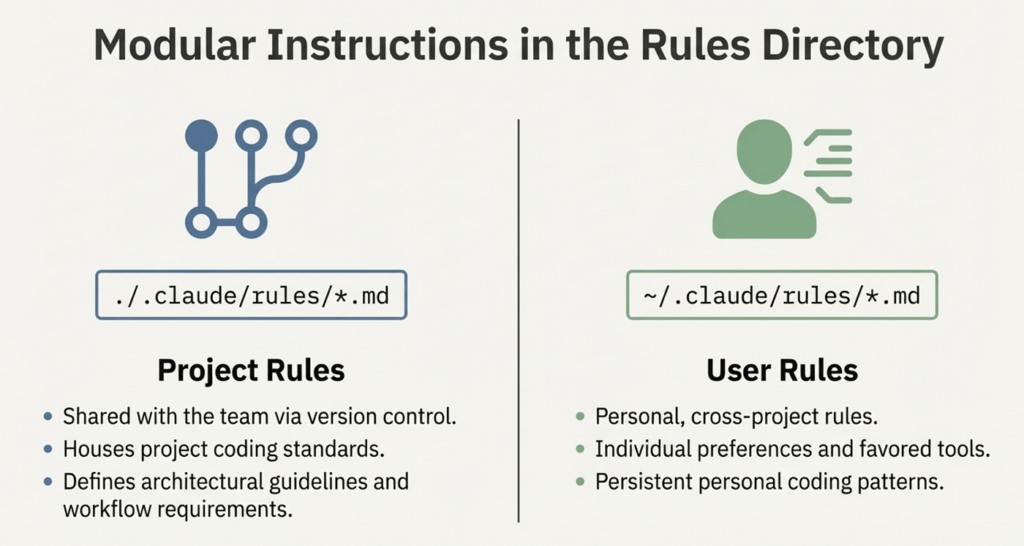
7. Tạo Project Instructions
Tương tự Cursor Rules, Claude cũng hoạt động tốt hơn khi có project-specific instructions.
Ví dụ:
# Project Instructions

- Use TypeScript strict mode.
- Do not use any.
- Follow NestJS architecture.
- Controllers should remain thin.
- Business logic belongs in services.
- Use Prisma for database access.
- Write maintainable code.
Nhờ đó, Claude sẽ hiểu convention của team tốt hơn.
8. Yêu cầu Claude Giải Thích Trước Khi Thay Đổi Kiến Trúc
Đối với các thay đổi lớn, đừng yêu cầu code ngay.
Ví dụ:
Before making changes:

1. Explain the current architecture.
2. Explain weaknesses.
3. Suggest improvements.
4. Describe migration strategy.
5. Then generate code.
Điều này đặc biệt hữu ích với:
- Microservices
- Event-driven systems
- Monorepos
- Large React applications
9. Sử dụng Claude cho Documentation
Claude có khả năng viết tài liệu kỹ thuật rất tốt.
Ví dụ:
Generate documentation for this module.

Include:
- Purpose
- Architecture
- Dependencies
- Data flow
- Example usage
Conclusion
Claude Code phát huy hiệu quả cao nhất khi được sử dụng như một kỹ sư đồng hành thay vì một công cụ sinh code. Vì vậy, hãy ưu tiên cung cấp context, yêu cầu phân tích trước khi implementation và tận dụng khả năng reasoning của Claude cho các quyết định kỹ thuật quan trọng.
Tóm lại, developer giỏi không phải là người viết prompt dài nhất, mà là người biết cách cộng tác hiệu quả với AI để tạo ra phần mềm chất lượng cao hơn.