
Lời Mở Đầu: Consumer — Nơi Mọi Thứ Có Thể Sai
Bạn đã hiểu Producer ghi data vào Kafka. Vì vậy, bây giờ câu hỏi tiếp theo là: làm sao đọc ra hiệu quả, không mất data, không đọc trùng, và scale được khi tải tăng?
Kafka Consumer không chỉ là poll() và xử lý (tham khảo Consumer API). Đằng sau đó là một giao thức phân tán phức tạp với nhiều edge case. Do đó, bài này sẽ giúp bạn hiểu tường tận để tránh các lỗi phổ biến trên production.
Xem thêm trong series:
- Kafka Producer — Batching, Acks và Exactly-Once (Bài trước)
- Kafka HA — Replication, ISR và Leader Election (Bài tiếp)
1. Consumer Group — Mô Hình Phân Phối Tải Thông Minh
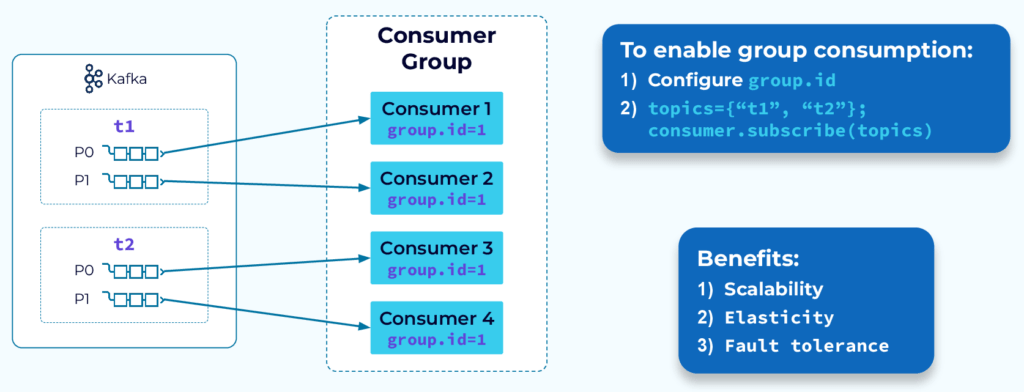
1.1 Nguyên Tắc Vàng: 1 Partition → Tối Đa 1 Consumer Per Group
Topic: order-events (4 Partitions)

Kịch bản 1: 4 Consumers trong 1 Group → Lý tưởng
┌─────────────────────────────────────────────────┐
│ Consumer Group: "billing-group"                  │
│                                                  │
│  P0 ──► Consumer-1                              │
│  P1 ──► Consumer-2                              │
│  P2 ──► Consumer-3                              │
│  P3 ──► Consumer-4                              │
└─────────────────────────────────────────────────┘

Kịch bản 2: 2 Consumers trong 1 Group → Mỗi Consumer đọc 2 Partition
┌─────────────────────────────────────────────────┐
│ Consumer Group: "billing-group"                  │
│                                                  │
│  P0 ┐                                           │
│  P1 ├──► Consumer-1                             │
│  P2 ┐                                           │
│  P3 ├──► Consumer-2                             │
└─────────────────────────────────────────────────┘

Kịch bản 3: 5 Consumers → 1 Idle!
┌─────────────────────────────────────────────────┐
│  P0 ──► Consumer-1                              │
│  P1 ──► Consumer-2                              │
│  P2 ──► Consumer-3                              │
│  P3 ──► Consumer-4                              │
│         Consumer-5: IDLE (ngồi chơi)            │
└─────────────────────────────────────────────────┘
Insight quan trọng: Số Partition của Topic là giới hạn trên cho mức độ song song của một Consumer Group. Muốn scale hơn? Tăng Partition (nhưng phải tăng từ đầu, hoặc khi tạo topic).
1.2 Nhiều Consumer Group — Cùng Data, Nhiều Mục Đích
Topic: order-events

Group 1: "billing-group"    → Xử lý thanh toán (đọc từ đầu)
Group 2: "analytics-group"  → Real-time dashboard (đọc từ đầu)
Group 3: "audit-group"      → Lưu audit log (đọc từ đầu)

Ba group đọc CÙNG data nhưng hoàn toàn độc lập về offset.
Đây là sức mạnh không thể thay thế của Kafka!
2. Giao Thức JoinGroup — Cách Consumer “Đăng Ký”
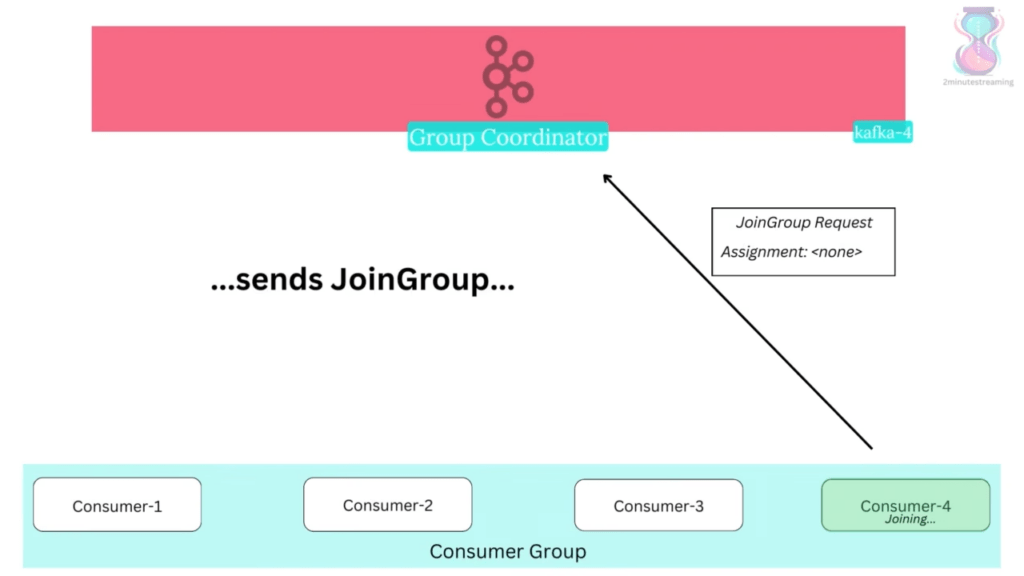
Khi Consumer khởi động lần đầu hoặc sau khi rebalance, nó phải tham gia Group qua giao thức:
Consumer-1                Group Coordinator (Broker)
    │                              │
    │── FindCoordinator ──────────►│
    │◄── CoordinatorInfo ──────────│
    │                              │
    │── JoinGroup Request ────────►│ "Tôi muốn join billing-group"
    │                              │   (Chờ tất cả member join)
    │◄── JoinGroup Response ───────│ "Bạn là Leader của Group"
    │   (nếu là Group Leader)      │ + danh sách tất cả member
    │                              │
    │── SyncGroup Request ────────►│ + assignment (nếu là Leader)
    │   (Leader gửi kèm plan)      │
    │◄── SyncGroup Response ───────│ "Partition của bạn: P0, P1"
    │                              │
    │── Heartbeat (mỗi 3s) ───────►│
    │◄── OK ───────────────────────│
Ai là Group Leader? Consumer đầu tiên join. Nó chịu trách nhiệm tính toán partition assignment cho cả group dựa trên Partition Assignor được chọn.
3. Partition Assignors — Ai Đọc Partition Nào?
3.1 RangeAssignor (Mặc định cũ)
Topic A: 3 Partitions (A0, A1, A2)
Topic B: 3 Partitions (B0, B1, B2)
Consumers: C1, C2, C3

Kết quả:
C1: A0, B0
C2: A1, B1
C3: A2, B2

Vấn đề: Nếu số partition lẻ:
Topic A: 3 partitions, 2 consumers
C1: A0, A1  (2 partitions)
C2: A2      (1 partition) → Không đều
3.2 RoundRobinAssignor
Partitions: [A0, A1, A2, B0, B1, B2] → phân phối xoay vòng
C1: A0, A2, B1
C2: A1, B0, B2
→ Phân đều hơn nhưng vẫn có vấn đề khi Rebalance
3.3 CooperativeStickyAssignor (Khuyến nghị Production)
Mục tiêu: Giữ nguyên assignment cũ nhiều nhất có thể khi Rebalance

Trước Rebalance:
C1: P0, P1
C2: P2, P3
C3: (vừa crash)

Sau Rebalance (Cooperative):
C1: P0, P1, P3  (giữ P0, P1 + nhận thêm P3)
C2: P2          (giữ P2)

→ Chỉ P3 bị "chuyển chủ", C1 và C2 KHÔNG bị dừng xử lý P0, P1, P2
4. Rebalance — Hiểu Đúng Để Không Bị “Giật Lag”
4.1 Trigger Conditions
Cụ thể hơn, Rebalance xảy ra khi:
- Consumer mới join group
- Consumer bị coi là “chết” (không heartbeat trong
session.timeout.ms) - Consumer gọi
unsubscribe() - Topic có sự thay đổi partition (tăng partition)
4.2 Eager Rebalance (Protocol cũ — “Stop the World”)
Bước 1: Coordinator nhận biết có thay đổi
Bước 2: Coordinator gửi RebalanceInProgress cho tất cả Consumer
         → TẤT CẢ Consumer dừng đọc, thu hồi partition
Bước 3: Tất cả Consumer gửi JoinGroup (đợi nhau)
Bước 4: Leader tính toán assignment mới
Bước 5: Leader gửi SyncGroup với assignment mới
Bước 6: Tất cả Consumer nhận partition mới, bắt đầu đọc

Total downtime: Từ lúc trigger đến lúc consumer đọc lại = vài giây đến hàng chục giây!
4.3 Cooperative Rebalance (Protocol mới — “Incremental”)
Bước 1: Coordinator thông báo: "Cần rebalance"
Bước 2: Từng Consumer CHỈ thu hồi partition sắp bị chuyển
         (Partition không bị chuyển vẫn được đọc bình thường!)
Bước 3: JoinGroup + SyncGroup cho partition bị thu hồi
Bước 4: Assign partition đã thu hồi cho Consumer mới

Downtime: Chỉ partition bị chuyển nhượng tạm dừng trong vài ms
→ 99% partition vẫn hoạt động suốt quá trình rebalance!
# Bật Cooperative Rebalance:
partition.assignment.strategy=org.apache.kafka.clients.consumer.CooperativeStickyAssignor
# Tránh bị kick sớm:
session.timeout.ms=45000 # 45s (mặc định 45s)
heartbeat.interval.ms=15000 # Gửi heartbeat mỗi 15s (phải < session.timeout.ms/3)
max.poll.interval.ms=300000 # 5 phút để xử lý 1 batch (mặc định 5 phút)5. Offset Management — Không Mất, Không Trùng
5.1 Auto Commit — Cái Bẫy Của Người Mới
// Config:
enable.auto.commit=true
auto.commit.interval.ms=5000  // Tự commit offset mỗi 5 giây

// Flow nguy hiểm:
t=0:   poll() → [M1, M2, M3, M4, M5]
t=2s:  Đang xử lý M3...
t=5s:  AUTO COMMIT: offset=5 (tất cả 5 message đều được đánh dấu "đã đọc")
t=6s:  Consumer CRASH khi đang xử lý M4
t=7s:  Consumer restart → Lấy offset=5 → BỎ QUA M4, M5!
       → Mất data! (At-most-once semantics)
5.2 Manual Commit Sau Khi Xử Lý Xong
Properties props = new Properties();
props.put(ConsumerConfig.ENABLE_AUTO_COMMIT_CONFIG, false); // Tắt auto commit
props.put(ConsumerConfig.MAX_POLL_RECORDS_CONFIG, 100);

KafkaConsumer<String, String> consumer = new KafkaConsumer<>(props);
consumer.subscribe(List.of("order-events"));

while (true) {
    ConsumerRecords<String, String> records = consumer.poll(Duration.ofMillis(100));

    for (ConsumerRecord<String, String> record : records) {
        try {
            processRecord(record); // Xử lý: lưu DB, gọi API...
        } catch (RetryableException e) {
            // Lỗi có thể retry → Không commit, retry sẽ đọc lại
            log.warn("Retryable error, will retry: {}", e.getMessage());
            // Cần logic để không bị infinite loop
        }
    }

    // Chỉ commit SAU KHI đã xử lý xong toàn bộ batch
    consumer.commitSync(); // Blocking, đảm bảo commit thành công
    // Hoặc:
    consumer.commitAsync((offsets, exception) -> {
        if (exception != null) {
            log.error("Commit failed, will retry on next poll", exception);
        }
    });
}
5.3 Commit Từng Message — Chính Xác Nhất Nhưng Chậm Nhất
for (ConsumerRecord<String, String> record : records) {
    processRecord(record);

    // Commit offset của riêng message này
    Map<TopicPartition, OffsetAndMetadata> offsetToCommit = Map.of(
        new TopicPartition(record.topic(), record.partition()),
        new OffsetAndMetadata(record.offset() + 1) // +1 vì commit offset = "next to read"
    );
    consumer.commitSync(offsetToCommit);
}
// Đây là At-least-once: nếu crash sau processRecord nhưng trước commitSync
// → Sẽ xử lý lại message đó khi restart
// → Cần consumer logic phải idempotent!
5.4 Đạt Exactly-Once: Offset + Data Trong Cùng Transaction
// Lưu offset vào cùng DB transaction với business data
// Không dùng __consumer_offsets của Kafka

connection.setAutoCommit(false);
try {
    // 1. Xử lý business logic
    orderRepository.save(order, connection);

    // 2. Lưu offset vào DB table riêng
    offsetRepository.save(
        groupId, topic, partition, record.offset(), connection
    );

    // 3. Commit DB transaction → Cả 2 atomic
    connection.commit();
} catch (Exception e) {
    connection.rollback(); // Cả 2 rollback
}
6. Consumer Lag — Chỉ Số Sức Khỏe Quan Trọng Nhất
Consumer Lag = Latest Offset (Broker) - Committed Offset (Consumer)

Ví dụ:
  Broker: Partition 0, latest offset = 50,000
  Consumer Group: Committed offset = 45,000
  → Lag = 5,000 messages

Lag tăng theo thời gian → Consumer đang xử lý không kịp!
Giải pháp:
  1. Scale Consumer (thêm instance, nhưng ≤ số Partition)
  2. Tăng max.poll.records (xử lý batch lớn hơn)
  3. Tối ưu business logic (giảm thời gian xử lý/message)
  4. Tăng số Partition (nếu đã scale Consumer tối đa)
Kết Luận & Takeaway
| Vấn đề | Giải pháp |
|---|---|
| Consumer Group không scale | Số Consumer > Partition → Consumer idle, phải tăng Partition |
| Rebalance dài gây lag | Dùng CooperativeStickyAssignor |
| Mất data | Tắt auto-commit, dùng Manual commitSync sau xử lý |
| Duplicate khi crash | Consumer logic phải idempotent |
| Exactly-once | Lưu offset vào cùng DB transaction với business data |
💬 Câu hỏi Senior: Để đạt Exactly-once ở phía Consumer, DB của bạn phải hỗ trợ điều gì? Và nếu bạn consume Kafka rồi ghi vào Elasticsearch (không có ACID transaction), bạn thiết kế idempotent như thế nào? Comment đáp án của bạn!
Xem thêm trong series:
- Kafka Producer — Batching, Acks và Exactly-Once (Bài trước)
- Kafka HA — Replication, ISR và Leader Election (Bài tiếp)